Working with Amazon Redshift and AWS offers powerful capabilities for data warehousing, data analytics, and integrating with other AWS services. Here’s an overview of how to get started with Redshift on AWS, including key concepts, tools, and best practices.
1. Setting Up Amazon Redshift
Table of Contents
Toggle- Create a Redshift Cluster:
- Go to the Amazon Redshift console in AWS.
- Click Create Cluster and specify configurations, such as Node Type (e.g., DC2, RA3), Number of Nodes, Database Name, Master Username, and Password.
- Select VPC, Subnet, and Security Groups to control access.
- Cluster Configuration:
- Node Types: Choose based on your use case:
- RA3: Optimized for cost-effective storage and high performance.
- DC2: Offers high-performance SSD storage for intensive workloads.
- Cluster Maintenance: Schedule maintenance windows and enable automated snapshots for backup.
- Node Types: Choose based on your use case:
- Connecting to the Redshift Cluster:
- Use SQL clients like SQL Workbench/J, DBeaver, or Redshift Query Editor to connect.
- Set up security by configuring Security Groups and IAM roles to allow access and permissions to other AWS services like S3 for data import/export.
2. Loading Data into Redshift
- Using Amazon S3:
- Store raw data in Amazon S3 and use the
COPYcommand to import data into Redshift tables. This command is optimized for batch data loads. - Example:
COPY tablename
FROM 's3://your-bucket/path/to/file'
IAM_ROLE 'arn:aws:iam::account-id:role/RedshiftRole'
FORMAT AS CSV;
- Store raw data in Amazon S3 and use the
- Data Pipeline:
- Automate data loading with AWS Data Pipeline or AWS Glue to orchestrate ETL jobs and data flows.
- Use AWS Glue to prepare, transform, and catalog data before loading it into Redshift.
3. Data Querying and Analysis
- Redshift Query Editor:
- The Query Editor in the Redshift console provides a browser-based SQL client for writing and executing queries.
- Use standard SQL to query Redshift tables and join data for analytics.
- Amazon Redshift Spectrum:
- Allows you to query S3 data directly without loading it into Redshift tables.
- Use external tables in Redshift to query data stored in S3 in open data formats (e.g., Parquet, ORC, JSON).
- BI and Analytics Tools:
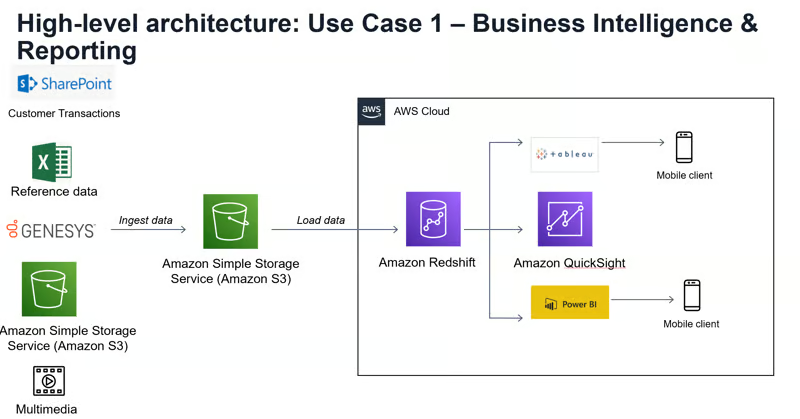
- Integrate Redshift with tools like Amazon QuickSight, Tableau, and Power BI for data visualization and dashboarding.
- Use AWS SDKs for programmatic access, enabling data queries and analytics from custom applications.
4. Optimizing Performance
- Distribution Styles:
- Choose distribution styles (
KEY,EVEN,ALL) to balance query performance based on your table’s size and join requirements.
- Choose distribution styles (
- Sort Keys:
- Use sort keys to optimize how data is physically stored, which improves performance for range queries.
- Compression:
- Apply column-level compression (
ENCODEoption) to reduce storage costs and speed up query performance.
- Apply column-level compression (
- Concurrency Scaling:
- Enable Concurrency Scaling for workloads with high query concurrency to improve response times without impacting performance.
5. Security and Compliance
- Data Encryption:
- Encrypt data in Redshift with AWS Key Management Service (KMS) or HSM for additional security.
- Access Control:
- Manage access through IAM roles and policies for Redshift users and applications.
- Use Amazon Redshift Spectrum for finer access control to S3 data.
- Monitoring and Auditing:
- Enable AWS CloudTrail for auditing access and actions on Redshift clusters.
- Use Amazon CloudWatch to monitor Redshift metrics like CPU usage, read/write IOPS, and disk space.
6. Cost Management
- Redshift Reserved Instances:
- For predictable workloads, consider Reserved Instances for cost savings.
- Redshift Spectrum:
- Optimize Spectrum queries to minimize S3 query costs.
- Pause/Resume Feature:
- For development and testing, you can pause and resume Redshift clusters to avoid unnecessary costs.
7. Data Integration and ETL
- AWS Glue:
- AWS Glue provides serverless ETL with built-in support for data transformation and cataloging.
- Lambda and Redshift:
- Use AWS Lambda for custom ETL jobs, invoking Redshift queries as part of event-driven workflows.
- Data Lake Integration:
- Redshift integrates with AWS Data Lake solutions, enabling centralized data storage and analytics across services like S3 and Redshift.
Sample Architecture for Data Analytics with Redshift on AWS
- Data Sources: Collect data from different sources, such as transactional databases, streaming data from Kinesis, and data dumps into S3.
- ETL Processing: Use AWS Glue or Lambda for data transformation and load it into Redshift using the
COPYcommand. - Analytics and Reporting: Execute SQL queries on Redshift or visualize data using Amazon QuickSight.
- Data Archival: Offload old data to Amazon S3 for long-term storage, accessible through Redshift Spectrum.
This setup enables a flexible, scalable, and cost-efficient data analytics solution leveraging Amazon Redshift’s data warehousing capabilities.
Connect with me:@ LinkedIn and checkout my Portfolio.
Please give my GitHub Projects a star ⭐️